
02
Widget iOS
Bringing the answers out of the app.
Designed in 2021 with iOS 14. Live today on the home screen of WindTre customers.
The most common question a telco user asks is: “How much do I have left?”
To answer it, users were opening the app, navigating menus, waiting for sync — sometimes multiple times a day, sometimes just before getting throttled, sometimes just after running out. iOS 14 made widgets a native surface of the home screen. We brought the answer there.
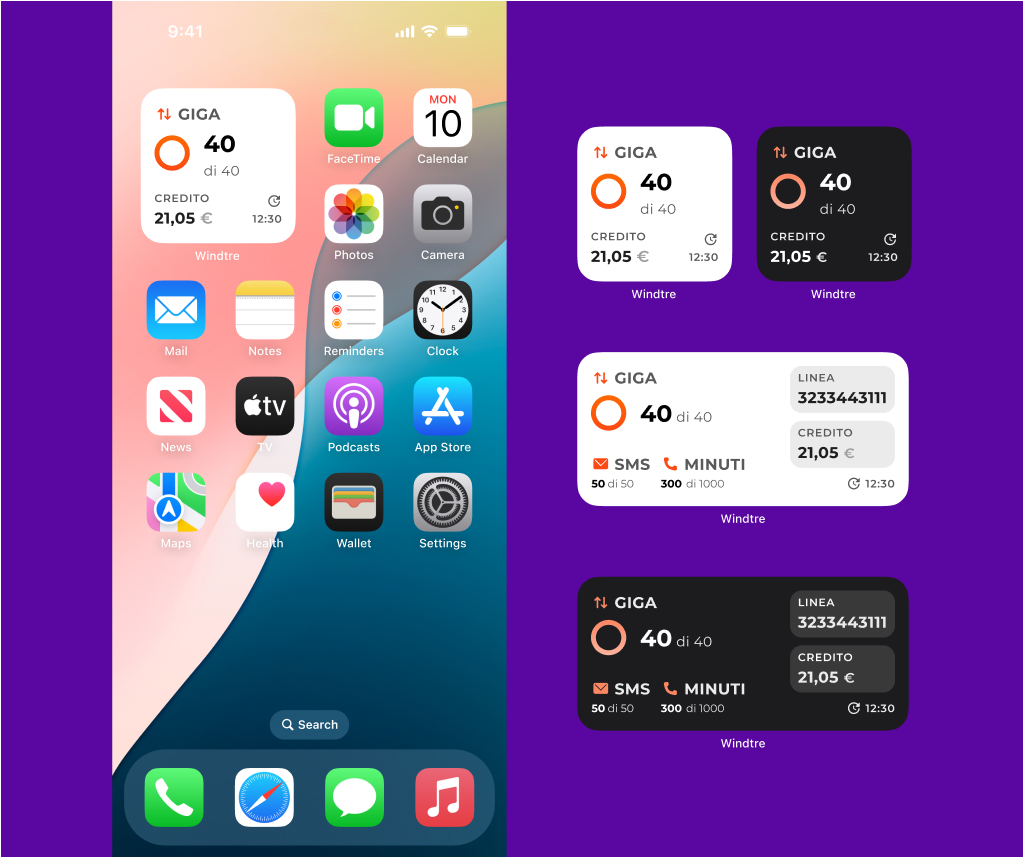
Bundle widget — small and medium, light and dark.
A NEW SURFACE
The home screen wasn't ours — it was the user's.
Apple opened up the home screen with iOS 14, but with rules: limited canvas, no font below 11 pt, single tap to open the app, no interactive controls until much later. Constraints that forced clarity.
Two canvases, two stories. Small (158×158) had to deliver the answer in a glance. Medium (338×158) used the extra room to surface secondary usage and account context — same grammar, more data.
158×158 px
SMALL
338×158 px
MEDIUM
A DISCIPLINE OF USE
Designing for the user. Designing for the business. Finding the line between them.
A widget on the home screen sits between two needs: the user's need for clarity (their data, their balance, their offer status — surfaced where they'd look) and the business's need for visibility (every high-impression surface is a potential revenue moment). Both are real. Both have weight.
The work was to find the line. We documented the discipline as part of the design system: real-time data and account information were core to the widget; promotional content and upsells were not. A consultation surface, not a conversion surface.
The line moved over time. Some widget variants shipped with promotional content — the commercial pressure on a telco's home screen is real, and design proposals don't always win. But the framework was set, the conversation continued, and the Bundle widget — the heart of the system — held its line.
The Widget Surfaces
Active offer data (Giga, min, SMS, including roaming)
Pending payments and unpaid invoices
Security enforcement
The Widget Doesn't
Promotional banners
Push of new offers
Teaser for paid services
Plan upgrade CTAs
Cross-sell
WHEN THE LINE MOVED
The first push was offers in the Bundle widget. We argued: the home screen at 9am is the moment a customer asks “how much do I have left?” — not the moment to sell them something. The proposal didn't ship.
Then “Please Don't Call” came — WindTre's call-screening service — with a state showing “Attiva il servizio” before activation. A soft CTA. We could have argued the same line as Bundle. We didn't, fully. A service activation aligns with the user's intent in a way a plan upsell doesn't. But it's still a CTA on a surface we'd defined as activation-free.
The Bundle widget kept its rule. Other widgets absorbed the exceptions. The framework survived not because we won every argument — because we had every argument, case by case.
Bundle — held the rule.

Attiva il servizio che ti protegge dallo spam
Please Don't Call — bent the rule.
BUNDLE WIDGET
A widget that changes shape with the user.
The bundle widget had to answer the question for every state a user could be in. Pre-config (just installed, no setup yet), default (loading or error), bundle active (the standard case), roaming (abroad).
Four types, one design pattern. Each type with its own sub-states for shaping, exhausted bundle, grace period, credit running low. The backend could throw any of these scenarios at any moment — the widget had to surface them clearly without making the user open the app.
Pre-config
Default
Bundle
Unlimited
High Speed
Roaming
Especially in trouble.
The widget mattered most when the user was in a problematic state. Bundle exhausted, offer suspended, grace period, credit running low — these are the moments where opening the app would feel like punishment.
The widget surfaced the problem before it became a wall.
Shaping
Bundle exhausted
Offer suspended
Grace period
Running low
STILL LIVE
Live on iOS today, used by WindTre customers — most of whom won't realise the rectangle on their home screen was designed as a system.
The widget held a structural tension. The user gets a clean answer to their question — “how much do I have left?” — without opening the app. The business loses an opening, an offer impression, a path to conversion. Same widget, opposite signs depending on which side of the desk you sit.
Adoption was never tracked. A widget that works reduces engagement — fewer openings, shorter sessions, less time on screen. Few teams reward features that succeed by making metrics shrink.
We didn't prove how much it helped. We know it works.
03
Design System
From scattered libraries to a single source of truth.
